
How to Auto Publish Blog Posts Without Creating an SEO Quality Problem
October 21, 2026

A content calendar can fall apart when every draft waits in a shared document for approval, links, formatting, and upload. Publishing every draft the moment it is generated creates a different problem: thin pages, duplicate angles, broken links, and topics that never earned a place on the site.
Rankdesk helps teams research, draft, review, and publish content through a controlled workflow. The goal is a dependable system where the right posts move quickly and uncertain posts stop at a review gate.
Quick answer: how to auto publish blog posts safely
Use this workflow to auto publish blog posts without turning your archive into an SEO liability:
- Map each topic to a search intent, a target URL, and a cluster before drafting.
- Generate a source-backed brief with a required structure, entity coverage, and internal-link targets.
- Send drafts through factual, editorial, and on-page SEO review gates.
- Publish approved posts to Ghost on a schedule with metadata, canonical URL, categories, and author details included.
- Check indexing, impressions, clicks, queries, and internal-link performance after publication.
- Refresh, consolidate, redirect, or pause the workflow when performance exposes a weak topic or content gap.
Build the topic map before you auto publish blog posts
Automation starts with selection. Every proposed article needs a job within the site, otherwise similar posts compete for the same query and leave readers with several incomplete answers.
Create a simple record for each topic: primary search intent, intended URL, parent hub, two to four contextual internal links, named subject-matter reviewer, and publication state. Assign one intent per URL. A comparison query, a how-to query, and a product-selection query each need separate pages because the reader expects a different answer.
For an illustrative Ghost publication called northstarcrm.com, the team plans a customer-retention cluster. Its existing hub is /guides/customer-retention/. A new article, /blog/customer-onboarding-checklist/, targets a practical checklist query and links upward to the hub plus sideways to an existing guide at /blog/reduce-customer-churn/.
The first proposed draft was titled “Customer Retention Tips.” It overlapped with the hub and several older posts. The team changed the assignment to a specific onboarding checklist, set a distinct outline, and retained the original phrase for the hub. That decision happened before a draft entered the queue.
Use a keyword map and revisit it as the archive grows. The approach in this guide to automated topic clusters, keyword mapping, and internal links gives a useful framework for identifying overlap early.
Set review gates for automated blog publishing
A review gate is a named condition a draft must meet before it can advance. Gates keep automation fast because reviewers inspect a focused set of risks instead of rereading every workflow instruction.
For the Ghost example, divide the queue into three states: draft, ready for scheduled publication, and published monitoring. A draft only reaches the schedule after the following checks are complete.
| Review gate | Owner | What to check | Result when it fails |
|---|---|---|---|
| Search intent and scope | Content lead | The page answers one defined reader need and has a distinct angle | Re-brief the draft or merge it into a stronger page |
| Evidence and claims | Subject expert | Product claims, dates, instructions, and cited sources are accurate | Return the draft with specific corrections |
| Editorial quality | Editor | Clear structure, useful examples, consistent voice, and no unsupported filler | Edit before approval |
| On-page SEO | SEO owner | Title, H1, headings, URL, meta description, schema, images, and links | Fix fields before scheduling |
| Publish readiness | Publisher | Ghost formatting, byline, category, canonical, and preview display | Hold publication until corrected |
A claimed fact needs a source or first-hand evidence. For advice involving Google Search, use Google’s own guidance on creating helpful, reliable, people-first content as a baseline for editorial decisions. It supports useful original analysis, a clear purpose, and evidence of experience.
Set a rule for low-risk and high-risk pieces. A straightforward glossary update with established facts may pass a lighter editorial check. Legal, financial, medical, pricing, migration, and product-comparison content should always require a qualified reviewer. Automatic publishing belongs after approval criteria have been met.
Add internal links and on-page SEO checks before publishing
Internal linking deserves its own gate because it shapes both discovery and context. Add links when they genuinely help the reader take a next step. Use descriptive anchors that describe the destination page rather than repeating a target phrase mechanically.
In the Northstar CRM article, the onboarding checklist includes a link to the retention hub after explaining why early activation affects renewal. It links to the churn article in the section on warning signs. A final contextual link sends readers to the product’s onboarding templates. Those links give the new URL a clear place in the site architecture.
Set a minimum of two relevant internal links per informational article: one link to a hub or commercial page where appropriate, and one to a related supporting article. Larger guides often warrant three or four. Avoid adding links simply to reach a quota.
Run these publishing checks in the same pass:
- Confirm the title and H1 promise the same topic and match the page’s actual scope.
- Write a unique meta description that explains the practical outcome.
- Check heading order, image alt text, visible author information, and accessible formatting.
- Verify every internal and external URL, then remove links that add little value.
- Add a self-referencing canonical where the CMS and site setup call for it.
Ghost users should also preview desktop and mobile layouts before scheduling. A table that breaks on small screens or a callout that loses formatting can reduce the value of an otherwise strong article. Review Google’s Search Essentials when establishing your technical quality checklist.
For broader link equity work, see how to increase domain authority with practical SEO strategies. Strong internal structure supports a content library, while relevant external links and useful pages support the site’s overall authority.
How Rankdesk and Ghost support a controlled publishing workflow
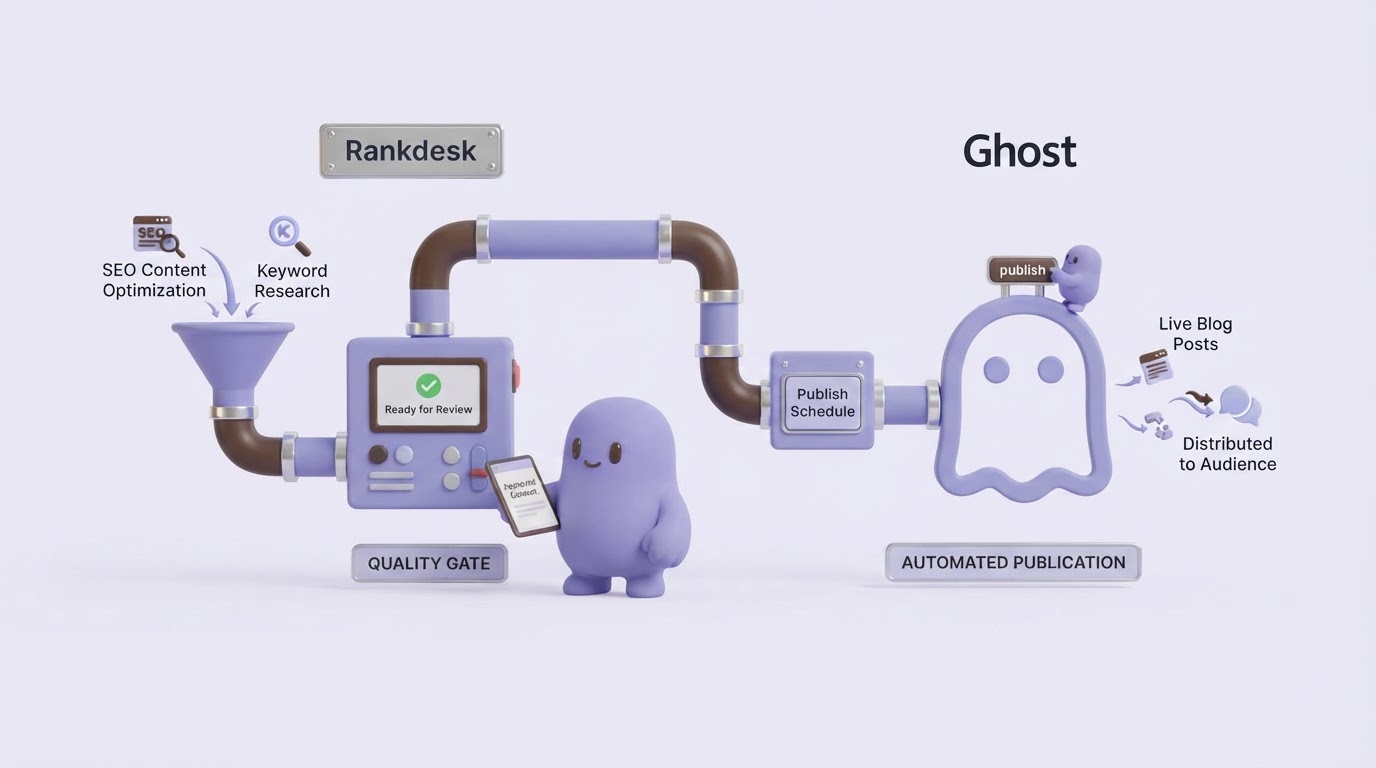
A reliable workflow needs enough speed to maintain cadence and enough control to prevent a rushed draft from reaching the live site. Rankdesk supports that process while Ghost handles the published article experience.
Start in Rankdesk by assessing the site, competing pages, and relevant keyword opportunities. For the Northstar CRM example, the research phase identifies that the checklist article needs actionable onboarding steps, setup owners, and links to related retention resources. The brief records those requirements before writing begins.
Next, create the article from the brief and assess the draft against the review gates above. Editors can improve the opening, replace general statements with product-specific information, confirm sources, and approve the internal links. This is where a team protects the expertise that a generic draft cannot supply.
Once approved, send the finished post to Ghost through the Rankdesk Ghost integration. Apply the approved title, slug, excerpt, tags, author, feature image, and scheduled date. Then use Ghost preview to inspect the reader-facing page before it goes live. The workflow avoids copying content manually between systems and creates a clearer record of who approved publication.
After publication, feed performance findings back into the next brief. An article that gains impressions for “customer onboarding plan” but receives few clicks may need a more direct title and description. An article that attracts visitors through an adjacent question may need a new section or a supporting post. This feedback loop is how automated publishing becomes a compounding editorial system.
Teams running larger queues can compare this model with the workflow described in AI Content Autopilot: How to Automate Publishing Without Losing Quality. Agencies can also adapt review ownership by client, industry, and approval level using the practices in this guide to scaling client SEO content.
Monitor every post after you auto publish blog posts
Publication starts the measurement window. Check the URL at set intervals, such as seven days for technical readiness and 28 to 56 days for early search signals. Give competitive queries more time before making major decisions.
Open Google Search Console and confirm that the URL can be indexed, then inspect impressions, clicks, click-through rate, and the queries producing visibility. Google explains the available reports in its Search Console Performance report documentation. Export the first 90 days first when you have enough data. Segment by page and query rather than relying on total site traffic.
For the Northstar CRM example, the article appears in search results for “customer onboarding checklist” and “SaaS onboarding checklist.” It also gains impressions for “onboarding email sequence,” a subject the page only mentions briefly. The editorial decision is to publish a dedicated email-sequence guide, link it from the checklist, and add a concise section that directs readers to the new guide.
Monitor AI assistant citations alongside traditional organic signals. Citation opportunities improve when a page gives direct answers, precise definitions, verifiable claims, clear authorship, and useful source references. The process is covered further in this practical guide to being mentioned by ChatGPT. Treat citations as a result of useful, accessible information rather than a metric to chase through repetitive wording.
Common mistakes when you auto publish blog posts
The most damaging failure mode is publishing from a queue that has no clear topic map. The result is usually overlap: multiple articles compete for a broad phrase, use similar headings, and distribute internal links without a clear hub.
Another frequent issue is a one-time quality check. Site content changes after publication. Product details evolve, linked pages move, and an article can lose relevance as search results change. Put recurring refresh dates into the workflow for pages with meaningful impressions or business importance.
Avoid rigid output targets. A schedule of four strong articles per month can outperform a larger batch that lacks research, review, or a clear audience. Publish frequency should follow the team’s capacity to maintain quality, refresh successful pages, and support each new article with internal links.
Finally, retain a human escalation path. A reviewer needs the authority to hold a piece when the brief has weak evidence, a sensitive claim, or an unclear angle. Pausing a single post protects the rest of the publishing system.
FAQ
Can I automatically publish posts to Ghost?
Yes. Schedule publication after the article has completed its editorial, factual, internal-link, and on-page checks. A controlled approval status gives the publisher a clear signal that the article is ready for Ghost.
How many blog posts should I publish each month for SEO?
Publish as many as your team can research, review, connect internally, and monitor after launch. Start with a manageable cadence, then increase it only after the workflow consistently produces useful pages and timely updates.
Will automatically published posts rank on Google?
Rankings depend on relevance, quality, technical accessibility, competition, and the site’s existing authority. Automated scheduling helps consistency, while research, expert review, and useful information determine whether the page earns visibility.
Should every article have a human review?
Human review is especially valuable for facts, experience-based advice, regulated topics, product claims, and commercial pages. Teams can use lighter checks for low-risk updates after they have established reliable templates and source standards.
How do I find posts that need to be refreshed?
Review Search Console data for URLs with falling clicks, high impressions and low click-through rates, new query themes, or outdated information. Also crawl the site regularly to find broken links, redirect chains, and orphaned pages.
If you want a more consistent way to plan, write, review, and publish search-focused content, see how Rankdesk works. It researches your site, competitors, and keywords, then creates articles and landing pages you can review or publish automatically.